The tools
After you speak, make it fit.
Tap the GPTboard logo at the top left of the keyboard and pick a tool. The result appears in a panel, and nothing changes until you tap Apply.

On a computer? Point your iPhone camera here.
How a tool works
What it reads
The text before your cursor, up to 256 words. Typed or dictated, it doesn't matter.
Empty field?
Then it uses the text you copied. That is how Reply answers a message someone sent you.
Apply
The result replaces your text. Until you tap Apply, your text stays as it was.
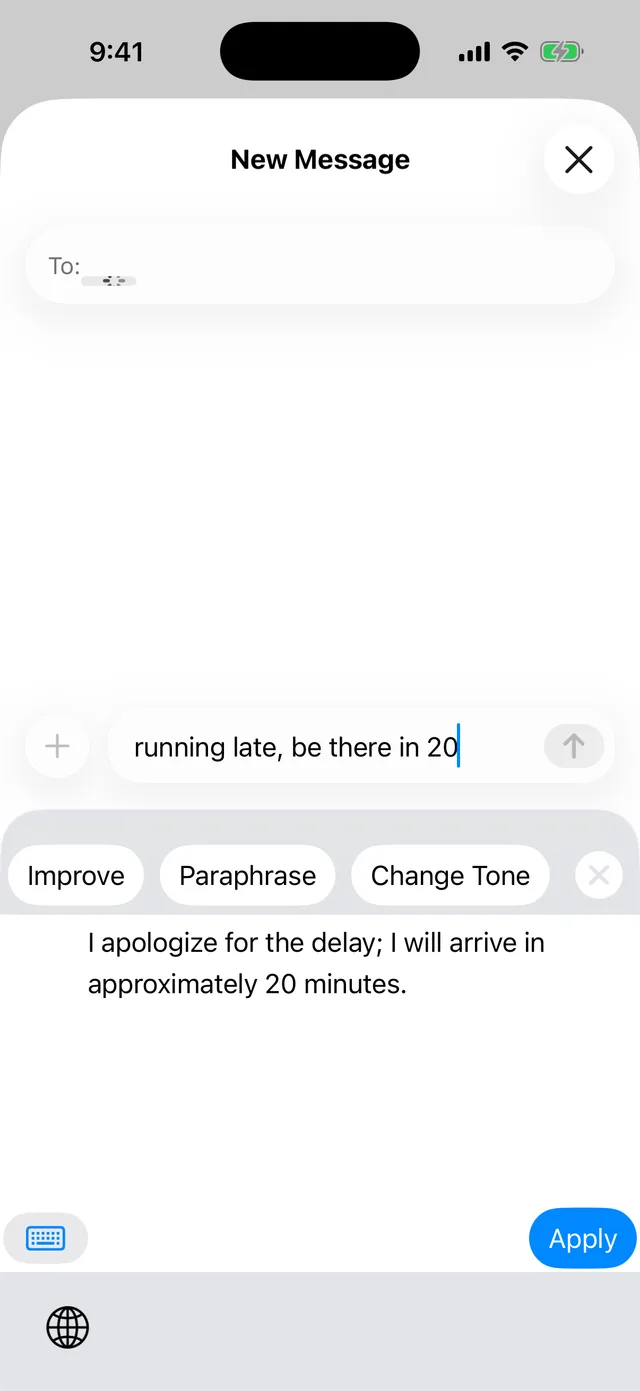
Change Tone, Formal: "running late, be there in 20" becomes "I apologize for the delay; I will arrive in approximately 20 minutes."
Improve
Rewrites your text in clear, standard English: grammar, spelling and wording fixed.
Improve always answers in English. Text in another language comes back in English.
Paraphrase
Says the same thing in different words, when your wording feels stale or repetitive.
Change Tone
Rewrites your text in one of 14 tones.
- Inspirational
- Empathetic
- Pessimistic
- Optimistic
- Humorous
- Sarcastic
- Romantic
- Friendly
- Informal
- Curious
- Formal
- Joyful
- Flirty
- Sad
Reply
Drafts a reply to a message.
Copy the message you got, go to the empty field where you answer, and tap Reply. GPTboard can't read the conversation on screen, only the text in the field or the text you copied.
Translate
Translates your text into one of 20+ languages.
Including Spanish, French, German, Hindi, Arabic, Chinese and Japanese, plus American, British and Canadian English. How translating works.
Good to know
Do the tools need Full Access?
Yes. iOS lets a keyboard go online only with Full Access, and the tools work online. Typing works without it.
Is there a limit?
Free use has a daily allowance, shared by voice typing and the tools. Premium, a monthly subscription, removes the daily limit.
Does it need Apple Intelligence?
No. The tools work the same on every iPhone and iPad with iOS 16.2 or later.
Is anything sent while I type?
No. Only a tool you tap, or the mic, sends anything. Privacy in plain words.
Say it. Send it clean.
Free to download. iOS 16.2 or later.