Translate
Speak one language, send another.
Say it in the language you think in. Then translate it before you send, without leaving the app you are typing in.

On a computer? Point your iPhone camera here.
How it works
Speak.
Tap the blue mic, talk in your language, and tap Done. The clean text appears in your language.
Translate.
Tap the GPTboard logo at the top left of the keyboard, choose Translate and pick a language.
Apply.
Check the translation in the panel, then tap Apply. It replaces your text.
Translation is a separate step after you speak, not something that happens while you talk. Set the language you speak once, in the GPTboard app.
A real example
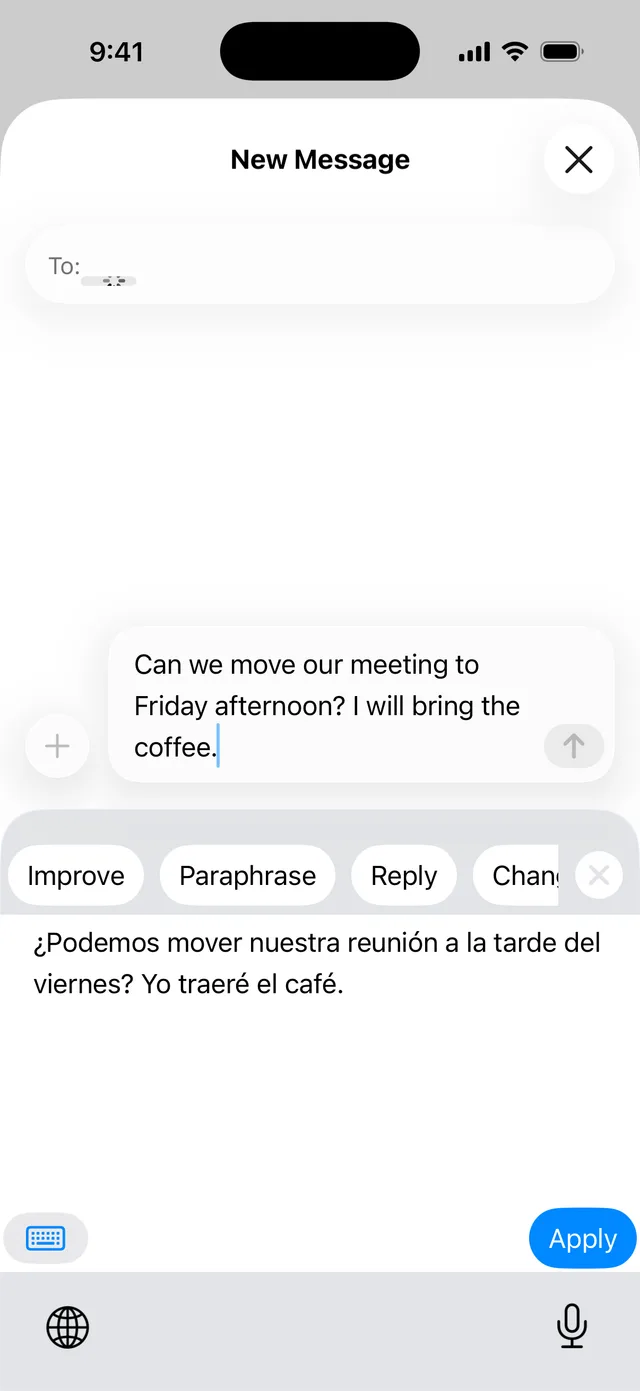
Your text
Can we move our meeting to Friday afternoon? I will bring the coffee.
After Translate, Spanish
¿Podemos mover nuestra reunión a la tarde del viernes? Yo traeré el café.
Languages you can translate into
English comes in three versions, so you can match the spelling your reader expects. The languages you can speak are listed on the voice typing page.
- French
- Spanish
- American English
- British English
- Canadian English
- Italian
- German
- Chinese
- Hindi
- Arabic
- Portuguese
- Dutch
- Swedish
- Greek
- Danish
- Finnish
- Urdu
- Indonesian
- Japanese
- Punjabi
- Marathi
- Telugu
- Tamil
- Turkish
- Vietnamese
Good to know
Can I type instead of speaking?
Yes. Translate works on any text before your cursor, typed or dictated, up to 256 words.
Can I translate a message someone sent me?
Copy it, leave the text field empty, and tap Translate. With an empty field, the tools use the text you copied.
Can I type in another alphabet?
The keyboard layout is English QWERTY, with accents on a long press. To write in another alphabet, speak in that language or translate into it.
Does it work offline?
No. Translating needs an internet connection.
Say it. Send it clean.
Free to download. iOS 16.2 or later.